
How to Cancel Activities in the Amilia App
1
How to Cancel a Registration
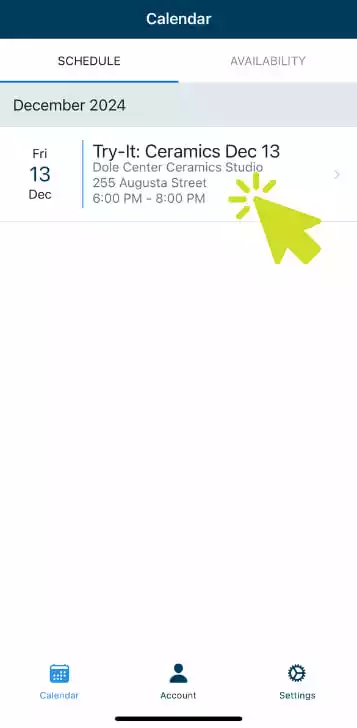
Click on the Calendar section on the bottom menu. Select the registration you would like to cancel.
2
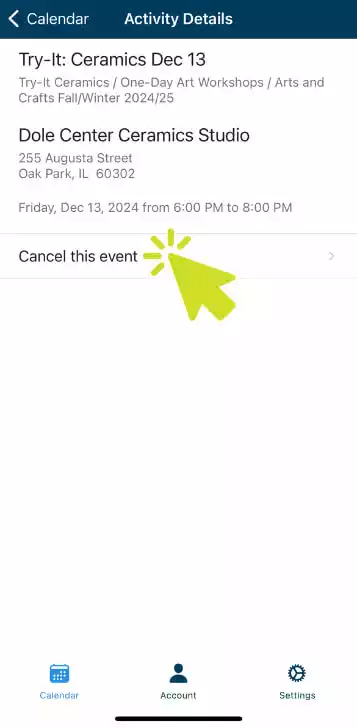
Confirm Event Cancellation
Select ‘Cancel this event’ at the bottom of the registration description.
3
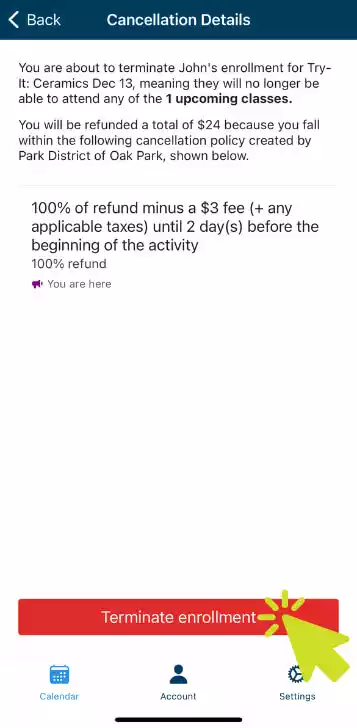
Confirm Your Enrollment Cancellation
Click the ‘Terminate enrollment’ button on the bottom of the screen to confirm your cancellation.
Download the Amilia App
For iPhone

For Android

Check what’s included in the app
- Use the app to access your membership cards and check in at the pool, rink, and CRC
- View your calendar to see what activities you’ve signed up for and what’s coming up
- Browse the store
- Cancel programs (some limitations apply)